I do my best to keep up with all the shiny things. I have my VCF home lab. I attend classes.
And, I have been “learning AI” (whatever that means) mostly through prompt engineering, osmosis, and through trainings at my day job.
I even coded-out some ui tools that help me in my day-to-day, and I continue to AI-ify my monthly newsletter.
Now I’ve hit a new milestone: Yes, fellow nerds, I have crossed over into the “vibe code zone” with Claude Code and I’m here to tell you all about it. I think the experience is a new chapter in productivity for me, to say the least.
An Aside for All You Devs Out There
I am not a developer, and I make no claims that Claude Code turns me into one. I also make no claims that the code I describe here is enterprise-ready.
I am on your side here: I leave the real coding to the professionals, code-assisted or not.
However, I do have a bone to pick with you: why didn’t you tell the rest of us about dotfiles? You have been holding out.
And that is NOT cool.
“A Perfect Storm” . . . “Opening the Floodgates” . . . “The Stars Aligned”
In a former life, I got formal training in adult learning theory and the best ways people learn. I have noticed that many of my peers lean towards the “kinesthetic learner” category: they learn best with hands-on experience. It’s very common with people in IT.
And yes, everybody is a kinesthetic learner to some extent. But I learn better if I see a demo first, or have someone at least somewhat qualified talk about it before I start typing.
This is why, in adult learning theory, the format Lecture -> Demo -> Lab has been the dominant format for IT training for decades: it ticks all the boxes.
Anyway, during my many weekend-wanderings, I just so happened to stumble upon this free course that got me into a very familiar environment (I am a sucker for a CLI) and got right to the code assistant part, instead of the usual 9 modules of AI intros like, “An Introduction to AI, Part 3.8: The 1950s”.
There were two other things that fell into place:
First, I have noticed that tmux is a common tool for use with AI coding assistants. I kept seeing it in screen-shares and tutorials. I dabbled with it back in the day. I am not a fan of its default shortcut keys. I am sure the tmux originators had their reasons, but why is the default keystroke for splitting a window vertically [Ctrl] + [B] . . . [Shift] + [5]?
. . .
OK, I just “searched it up” and tmux uses [Shift]+[5] (%, really) because the % symbol is a visual representation of the split screen action it performs.
DAMMIT, THAT MAKES SENSE. . . . MAN! . . . I’M GETTING EXISTENTIAL NOW . . . WHY DID I EVEN DO THIS?
Second of all, the advice I have been given about how to “learn AI” has been to find yourself a passion project and code it out.
So maybe I should just code out my own automated configuration of tmux as my first AI learning project?
I Coded Out My Own Automated Configuration of tmux as My First AI Learning Project
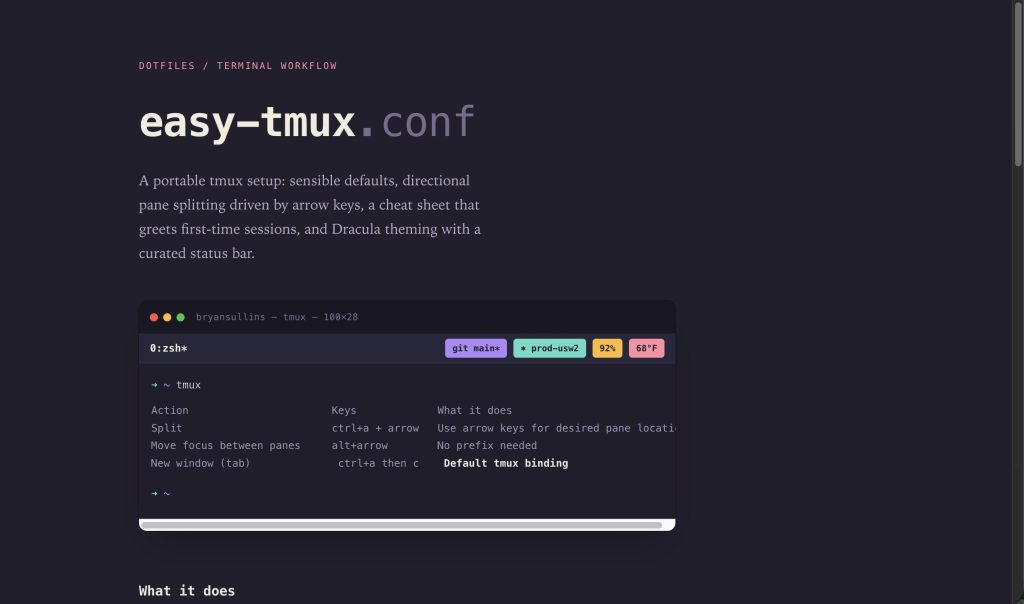
Behold! You shall delight in the glory and wonderment that is my creation, easy-tmux! Feel free to peruse the README, but for now I have commentary on the process . . .
Code assistants are on a sliding scale: “vibe coding” is at one end while, “I will not be using these code assistants, they are all poppycock!” on the other. IDE-based “let me help with that” code assistants are somewhere in-between.
What I have done here is 98% vibe coded. My current take (which could change next month) is that this personal project, which is a simple set of bash shell scripts and a set of config files, vibe coding is acceptable here. There is a disclaimer in the README that says use at your own risk, so there’s that!
The way I look at it, vibe coding literally flips the script: rather than the human coding it first and Claude checking it, Claude codes it first and then the human checks it.
The Two Types of AI Users
I have noticed that there are two types of AI users:
- The responsible adult peer-reviewer proofreaders who double check Claude’s work before publishing.
- Neanderthal mouth-breathing copy and pasters.
My rule of thumb is that I would never vibe code in a scripting/programming language I don’t know. I know people who do (you know who you are!), but I would be lying if I said there won’t be a day when I publish a Rust project subtitled, “I’M NOT SURE HOW THIS APP DOES DOES IT EXACTLY BUT IT MAKES SHINY-LOOKING THINGS ON THE SCREEN I HOPE”
What is easy-tmux?
From the README:
“(easy-tmux is) A portable tmux setup: sensible defaults, directional arrow-key pane splitting, a first-run keybinding reminder, and the Dracula theme with a curated set of status bar widgets.”
Give it a whirl and let me know if there are any feature requests or improvements I can make. Better yet, fork it and make it your own!
What I Learned
So, what is it like to vibe code?
In a word: transformative. If I were to code all of this out myself, including the git repo and the markdown, this likely would have taken me about 3 days of full time work; let’s call it 24 hours of dedicated hours.
I finished the first pass in about 90 minutes, and I have been iterating since.
Somewhere along the way, I prompted Claude to “create a git repo for this project with the standard list of file structures (README, CHANGELOG, .gitignore etc.) according to git standards with an MIT license”.
And then it did, letting me read over the contents.
Devs and platform engineers everywhere have their own automated tools to create common git repo structures, but it’s nice to be able to do it through a flow . . . no switching windows, no “Ah crap, I forgot to init the git directory.” Just prompt in what you want and keep things moving.
Another example is I gave Claude the url to keepachangelog and told it to “follow the guidelines there whenever I make a change to easy-tmux.”
And it does!
Claude Rabbit Holes
What has been most valuable is learning about how to better utilize Claude. I learned about dotfiles (aforementioned) and Claude’s various ancillary files.
Pro-tip: each Claude session is ephemeral on purpose. If you want Claude to do a thing consistently, you have the CLAUDE.md global config file and other project-scoped files that get read at session start. It’s like you have a co-worker who is the main guy from Memento, so each time you work with him you have a sticky note on his monitor to remind him of all the rules and configurations.
As part of this very post, Claude taught me about github pages, which I had never used before. How do you think I got the screenshot for this post?
I have been out of the IaC coding game for over 4 years, so picking up these new concepts are invaluable and I hope to keep building on them.
Thank you for reading and here’s to hoping I don’t go another 9 months without posting.
Hit me up on Bluesky @realbryansullins or email me at bryansullins@thinkingoutcloud.org. I would love to hear from you.


Leave a Reply